Security Automation with n8n: Alert Routing and Enrichment
September 03, 2026
What I focused on
This week, I focused on learning the fundamentals of workflow automation with n8n.
The goal was to better understand how an event can trigger a series of automated actions and how that process applies to security operations.
Rather than only learning the theory behind automation, I deployed n8n and built workflows that received, evaluated, enriched, and returned data.
Why this matters
Security teams regularly receive alerts from different tools and data sources. Processing every alert manually can slow down triage and make repetitive tasks more difficult to perform consistently.
A workflow can receive an alert, inspect its fields, route it according to conditions such as severity, and add information that helps determine the next action. Building this effectively still requires an understanding of the event, its data structure, and the result each branch should produce.
Concepts I explored
This week’s topics included:
- Docker images, containers, port mapping, and persistent storage
- n8n triggers, nodes, and node-to-node data flow
- HTTP requests and JSON responses
- Webhooks and event-driven workflows
- Conditional routing based on alert severity
- Alert enrichment and structured response data
- Testing webhook input with
curl
Lab / Exercise
Objective
The goal of this exercise was to:
- Deploy n8n in a Docker container with persistent storage
- Become familiar with the n8n interface and available trigger types
- Build and test a basic API request workflow
- Create a webhook-driven security alert workflow
- Route and enrich alerts based on their severity
Environment
I worked with:
- Operating System: Ubuntu virtual machine
- Tools: n8n, Docker, and
curl - Services: n8n web interface and the JSONPlaceholder test API
- Log sources: Synthetic JSON security alert payloads
- Network setup: n8n exposed locally on TCP port
5678 - Other relevant components: A local
~/.n8ndirectory mounted into the container for persistent data
What I did
I started by creating a local data directory for n8n and running the application in Docker. The local directory was mounted into the container so that workflows, credentials, and settings would persist independently of the container. Before downloading the n8n image, I removed an unrelated Glastopf Docker image from the lab system to reclaim disk space.
After opening the n8n interface, I explored the available trigger types and built a simple workflow using a Manual Trigger node. I connected it to an HTTP Request node that sent a GET request to a public test API. Running the workflow showed how each node receives data, performs an action, and passes its output to the next node.
I then built a Security Alert Handler workflow. A Webhook node received a synthetic alert as a JSON payload, and an IF node evaluated whether its severity field was equal to high. The high-severity path used a Set node to retain the original alert fields while adding a recommended block_ip action and a P1 priority. The workflow then returned a successful response through a Respond to Webhook node.
I tested the workflow by sending an HTTP POST request from the terminal. Seeing the request move through each node and return the enriched data made the relationship between an incoming event, conditional logic, and workflow output easier to understand.
n8n initially looked more complicated than it was. Its visual approach reminded me of Scratch, where programming logic is assembled from blocks, and Logisim, where digital logic simulations are built by connecting components. It also felt familiar because Adobe Target uses fields and dropdown selections to define audiences and criteria. These comparisons helped me understand the interface, but the exercise also showed that visual tools do not remove the need for technical context. To build a useful workflow, I still need to know which events can start it, what data those events contain, and how that data should be handled.
Example command
curl -X POST "http://localhost:5678/webhook-test/<webhook-path>" \
  -H "Content-Type: application/json" \
  -d '{"alert_type":"brute_force","source_ip":"192.168.1.50","target":"ssh","severity":"high","timestamp":"2025-01-01T12:00:00Z"}'
Screenshots
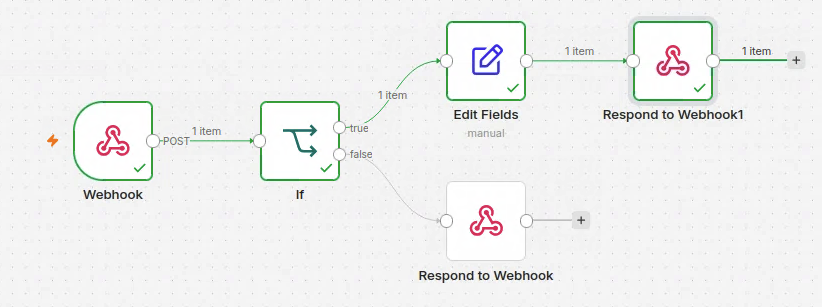
The completed Part 1 workflow routes a high-severity webhook alert through conditional evaluation, enrichment, and a webhook response.