Security Automation with n8n - Part 2: AI-Assisted Triage and IP Enrichment
September 07, 2026
What I focused on
This week, I focused on adding AI-assisted alert triage to the n8n workflow I built in Part 1 and then extending it with IP reputation enrichment.
The goal was to better understand how an automation platform can send structured alert data to an external AI service, receive a useful summary, and add threat-intelligence context before the alert reaches that step.
Rather than only learning the theory behind API integrations, I connected n8n to the OpenAI and VirusTotal APIs, built separate paths for public and private IP addresses, and tested the completed workflow with synthetic alerts.
Why this matters
Security alerts often contain structured data that an analyst must interpret before deciding what to do next. AI can turn that data into a short human-readable summary, while a threat-intelligence source can provide additional context about an external indicator.
The order of these steps matters. Enrichment should happen before summarization when the additional context is relevant, and internal addresses should not be sent to a public reputation service when that service cannot provide meaningful information about them.
These services also introduce operational considerations. API credentials must remain protected, external requests add latency, AI usage has a separate cost, and generated recommendations should remain advisory rather than directly triggering a destructive response.
Concepts I explored
This week’s topics included:
- OpenAI API authentication and AI-generated alert summaries
- The distinction between a ChatGPT Plus subscription and OpenAI API billing
- External API latency and token usage
- VirusTotal API authentication through an
x-apikeyheader - Public and private IPv4 classification with conditional logic
- IP reputation enrichment before AI-assisted analysis
- Branching and data flow between n8n nodes
- Test webhook registration and repeated
curltesting - Protecting credentials and sensitive values in documentation
Lab / Exercise
Objective
The goal of this exercise was to:
- Connect the existing security alert workflow to the OpenAI API
- Generate a concise alert summary and recommended response
- Identify whether a source IP should be treated as public or private
- Enrich public IP addresses through the VirusTotal API
- Verify the public and private workflow paths with synthetic alerts
Environment
I worked with:
- Operating System: Ubuntu virtual machine
- Tools: n8n, Docker, and
curl - Services: OpenAI API and VirusTotal API v3
- Log sources: Synthetic JSON security alert payloads
- Network setup: Local n8n test webhooks on TCP port
5678with outbound HTTPS API requests - Other relevant components: n8n Header Auth credentials and conditional workflow branches
What I did
I began Part 2 by adding an HTTP Request node to the high-severity path from Part 1. I generated an OpenAI API key, stored it as an n8n credential, and configured the request to send the alert to an OpenAI model. This also taught me that ChatGPT and the OpenAI API are separate platforms: my ChatGPT Plus subscription did not include API usage or credits.
After executing the workflow, the canvas remained active while n8n waited for the external request to complete. The expected response eventually arrived, including an AI-generated summary of the alert and a suggested action. This made the effect of external API latency visible within the workflow.
I then expanded beyond the Part 2 lab by adding a second IF node named Is Public IP IF. It evaluates the alert’s source_ip against a simplified regular expression for common private and non-public IPv4 ranges. A public result follows the VirusTotal path, while a private result bypasses VirusTotal and continues to the AI summary.
For the public path, I added another HTTP Request node that calls the VirusTotal API v3 IP-address endpoint. I created a separate Header Auth credential for the VirusTotal API key. This lookup provides reputation context about a public IP before the item continues through the AI and response portions of the workflow. VirusTotal enriches the alert with available reputation data; it does not independently prove that an IP is safe or malicious.
I tested the public route with a synthetic alert containing 8.8.8.8, a real public address operated by Google for its DNS service. I used it only as a benign value for testing the API path. All nodes on the public route executed, including the VirusTotal request. I then tested 192.168.1.50, a private address from the original lab payload. The workflow correctly skipped VirusTotal while still sending the alert through the AI summary and response nodes.
During repeated tests, I received a 404 response stating that the test webhook was not registered. I learned that an n8n test webhook accepts one call after the workflow begins listening, so I needed to execute the workflow again before sending another test request.
This exercise showed me that adding AI to a workflow can be as straightforward as authenticating to an API and connecting another node. The more important design work is deciding when that API should run and what context it should receive. My current severity check already prevents the low-severity path from calling OpenAI. The public and private IP check improves the relevance of the enrichment, but both high-severity paths still call OpenAI. Reducing AI cost further would require another gate based on factors such as risk, duplication, or whether an alert needs summarization. Richer context can improve the result, but it may also increase the number of tokens sent to the model.
Example command
curl -X POST "http://localhost:5678/webhook-test/<webhook-path>" \
  -H "Content-Type: application/json" \
  -d '{"alert_type":"test_alert","source_ip":"8.8.8.8","target":"dns","severity":"high","timestamp":"2026-09-07T12:00:00Z"}'
Screenshots
Part 2 workflow
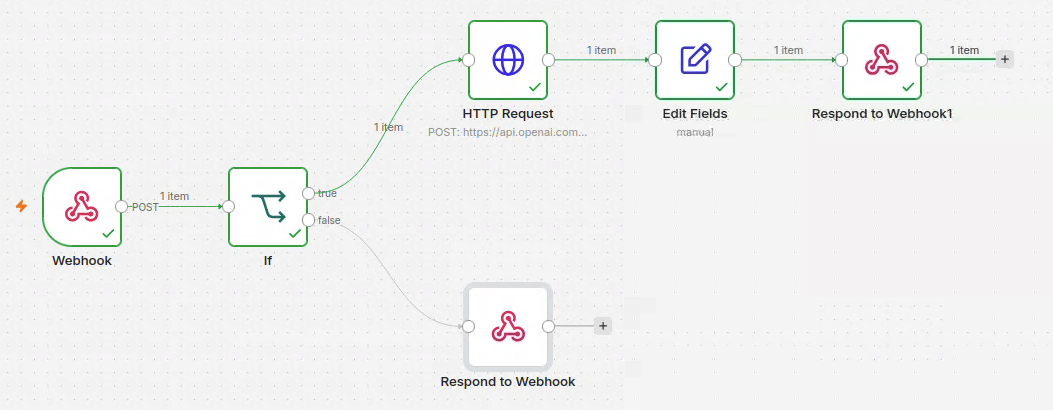
The completed Part 2 lab sends high-severity alerts to OpenAI for summarization before enriching the response with an action and priority.
IP classification and VirusTotal configuration
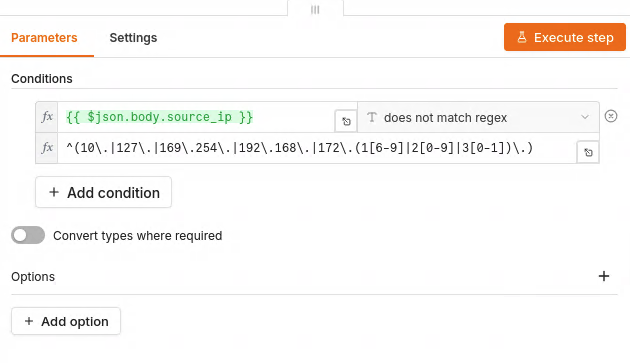
The additional IF node uses a simplified lab-focused regular expression to route common private and non-public IPv4 ranges away from VirusTotal.
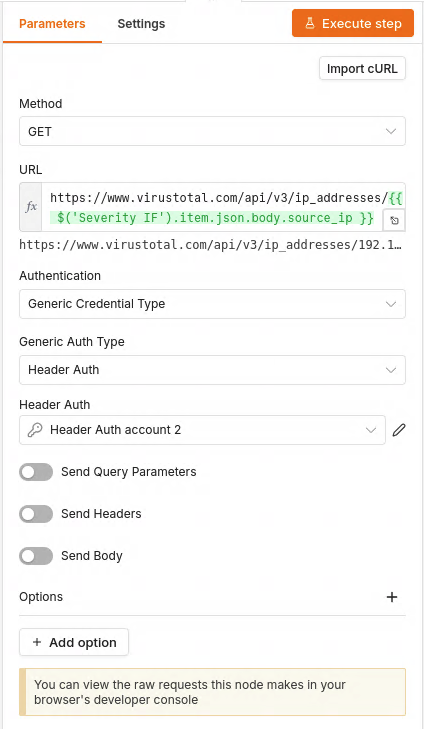
The VirusTotal request uses the API v3 IP-address endpoint and a stored Header Auth credential. The API key is not exposed in the workflow or screenshot.
Public IP test
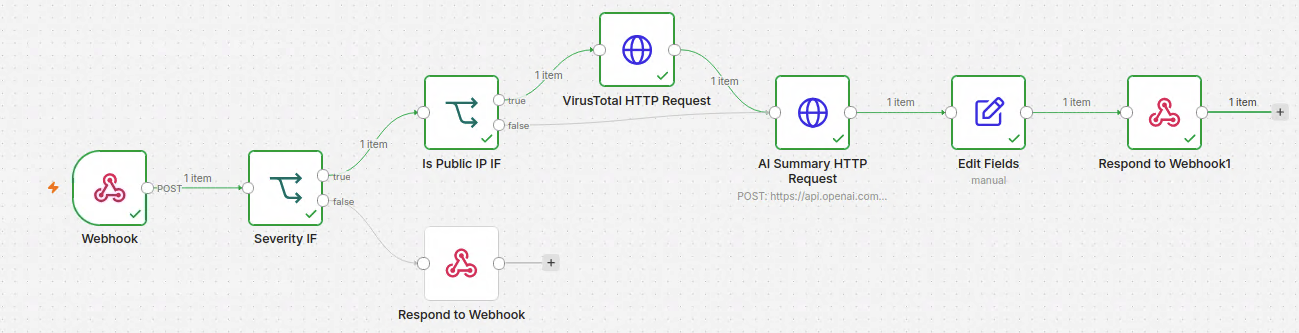
A synthetic alert containing 8.8.8.8 follows the public branch and executes both the VirusTotal and AI requests.

The redacted terminal output confirms that the public test alert received a completed webhook response.
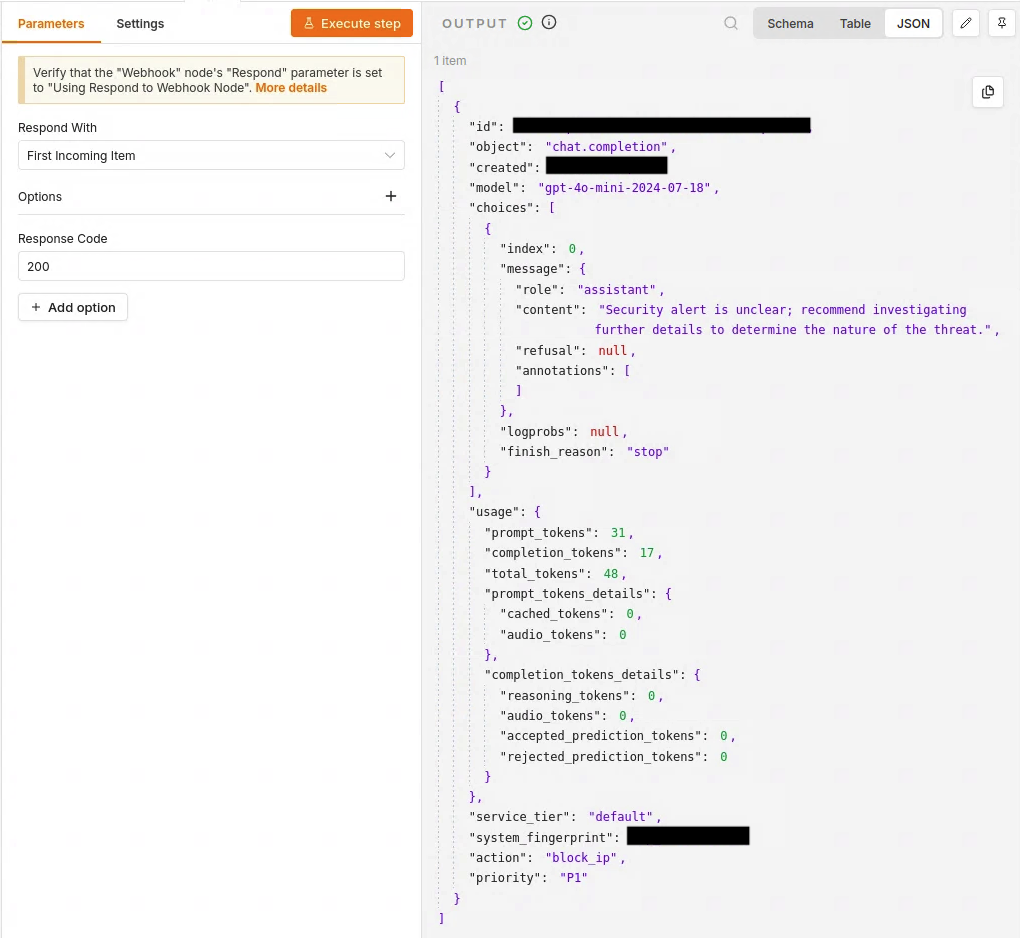
The AI found insufficient context for a stronger conclusion and recommended further investigation. The block_ip action and P1 priority are fields added by the workflow rather than a VirusTotal or AI verdict.
Private IP test
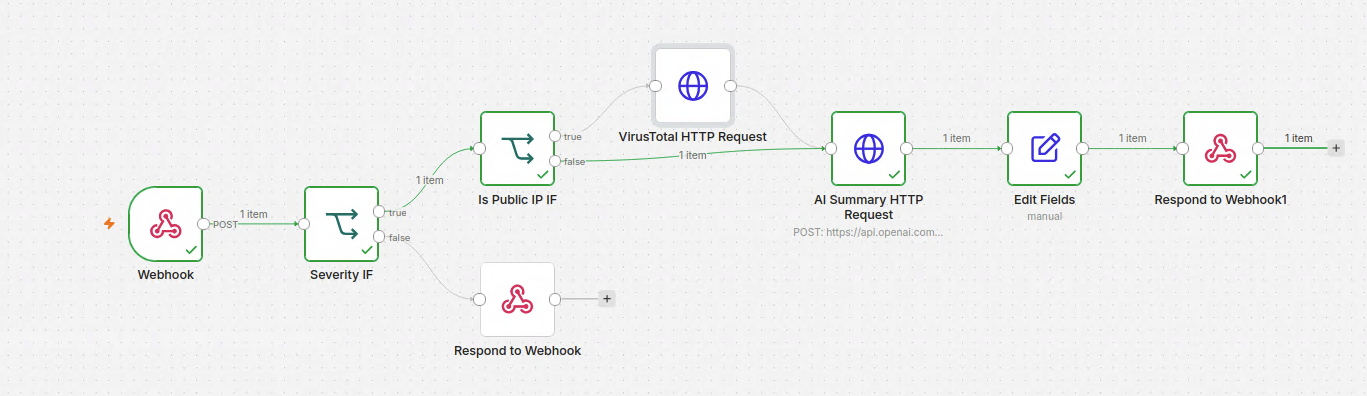
A synthetic alert containing a private source address bypasses VirusTotal but continues through the AI and response nodes.

The redacted terminal output confirms that the private test alert completed without calling VirusTotal.
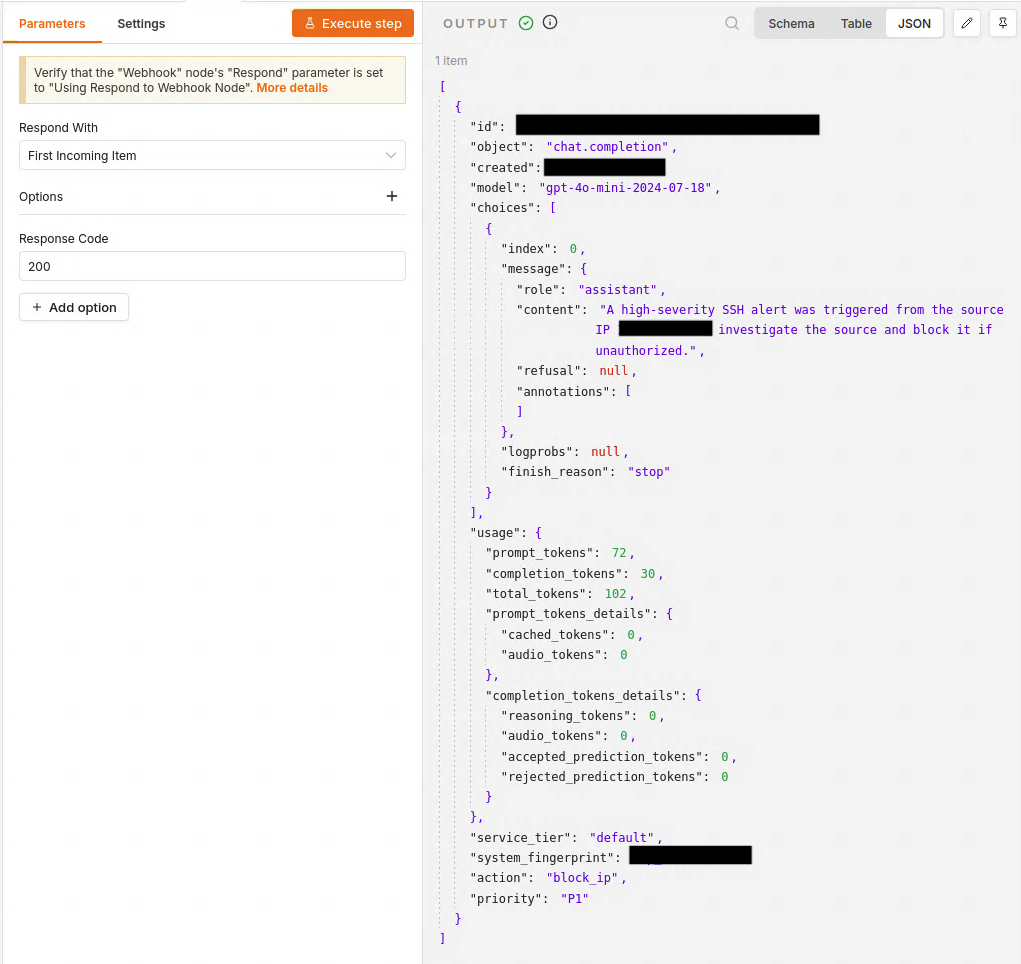
The private alert receives an AI-generated summary and the same manually configured action and priority fields.